Choose one viewing task, test the stand with the complete mounted set, and make labels readable. Add more designs only while the display remains easy to browse.
Check what the stand actually supports
A press-on nail display stand may hold individual tips, mounting cards, or several finished sets. Gelous describes its Nail Tip Stand as five magnetic pieces for painting, practice, and display. Ersa Nails lists an acrylic display stand measuring 15 × 20 cm and says the nails shown are not included. These examples explain different formats; they are not a tested ranking or a confirmed US delivery recommendation.
A painting stand can show individual design samples, but count the holders before assuming it presents a complete ten-nail set. A rack for finished cards serves a different task: keeping designs together while people browse. Choose by the actual support system and contents rather than the word stand.
Three layouts to start with
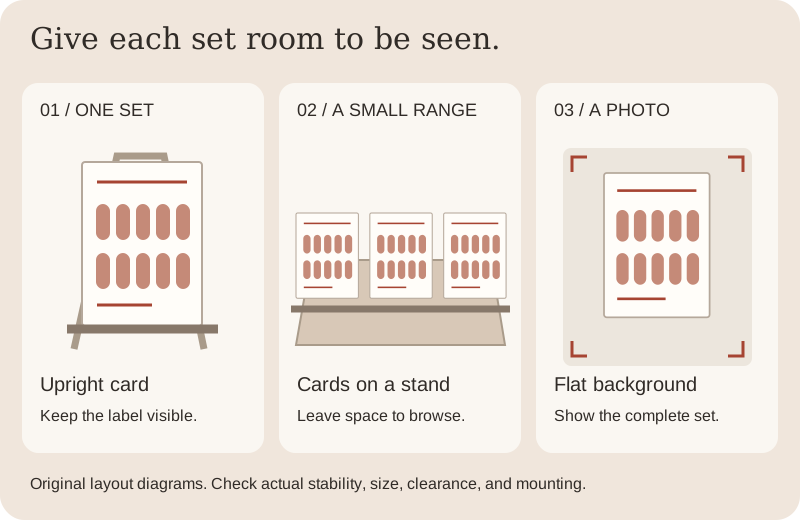
Start with fewer sets than the available space seems to allow. Look from the expected seated or standing position. If one card hides another, adjust the spacing or remove a row rather than relying on viewers to rearrange the display.
| Layout | Use it for | Keep visible |
|---|---|---|
| One portrait card on a support | A featured set on a shelf or tabletop | The full arrangement and its design label |
| A short row of mounted cards | Browsing several finished sets side by side | One clearly identified set per card, with space between designs |
| One card against a plain photo backdrop | A repeatable photograph of a complete set | Every nail, the design details, and an uncluttered edge around the card |
Test the loaded arrangement
Assemble the support according to its instructions on the surface where you will use it. Add the actual mounted cards and check that the base sits flat and does not rock during ordinary handling. Keep it away from the table edge; a narrow footprint or a tall arrangement needs particular attention.
Check the slot or support against the card’s thickness. A slot that accepts a bare card may not accommodate added backing. Keep tips and raised decorations clear of neighboring cards, rails, and the tabletop. If a card leans or slips, use a suitable support instead of bending the card to force a fit.
Make each set easy to identify
Give every design a short name or reference, then add the shape and length where those details matter. For custom work, distinguish a display sample from the exact set a customer would receive. Keep private order details on a separate record, away from public display photographs.
Use consistent left- and right-hand arrangements so someone can understand the whole design. Put labels below or beside the mounting area and check them at the expected viewing distance. The separate card guide includes a printable template and mounting checks.
Show the design clearly in photographs
Use a plain backdrop that separates the nail edges from their surroundings. Take one complete-set view and one closer view of the detail or texture. Keep the camera position and lighting similar when comparing designs, and check that glossy reflections do not cover the artwork.
For transparent or sheer designs, show the background you used rather than implying the card color is part of the nail. Keep a side view when raised details matter. Avoid color-changing filters; even careful photographs cannot guarantee the same appearance on every screen.
Plan where the sets go afterward
An open display makes browsing easier but does not enclose the nails for storage or travel. Move each set into suitable packaging after the session and keep its design reference attached. Follow the stand maker’s cleaning directions rather than assuming acrylic, coatings, or magnetic pieces tolerate a nail remover.
A few common questions
Is a nail painting stand the same as a press-on display stand?
Some products support both tasks, but their capacity and mounting systems differ. Check whether the stand holds individual tips, a complete set, or cards containing several designs.
How many sets should I put on one display?
Use the number that remains stable, readable, and unobstructed in your actual space. Check the stand’s specifications and the size of your mounted designs rather than assuming a universal capacity.
Can I leave my nails on a display instead of using a storage box?
A stand is useful for viewing, but it does not provide an enclosure. Choose separate storage when you need to put the set away or transport it.
Sources & reading notes
This guide explains general considerations. Product labels and instructions vary, so check the specific kit and adhesive you use.